
the only recipes app you need
Save recipes straight from TikTok, Instagram and YouTube — even videos with no written recipe at all. Then cook from what you’ve got, all in one place. Buttter does the typing; you just cook.
 Scan to install
on your iPhone
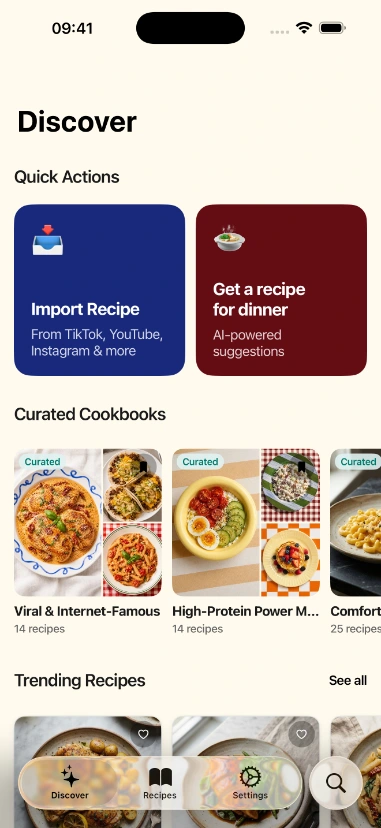
Grab a recipe from literally anywhere
A website. An Instagram post. Even a TikTok with no written recipe at all. Paste a link and it’s yours — measured, formatted, and saved. Wait, it can do that? Yep.
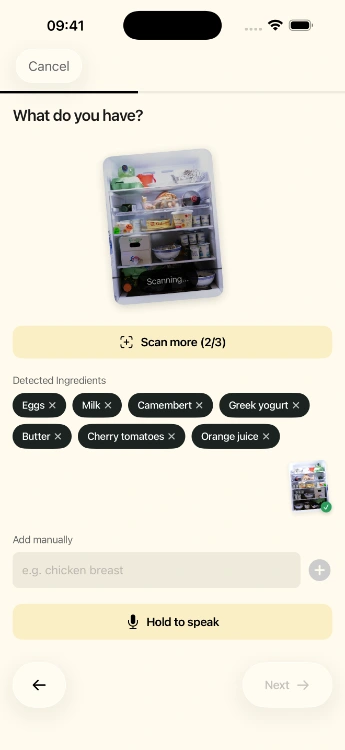
Out of ideas? Point your camera at the fridge.
Snap your pantry, your fridge, or a random pile of ingredients. Buttter builds a real recipe from what you’ve actually got — tuned to your tastes. Dinner, solved.
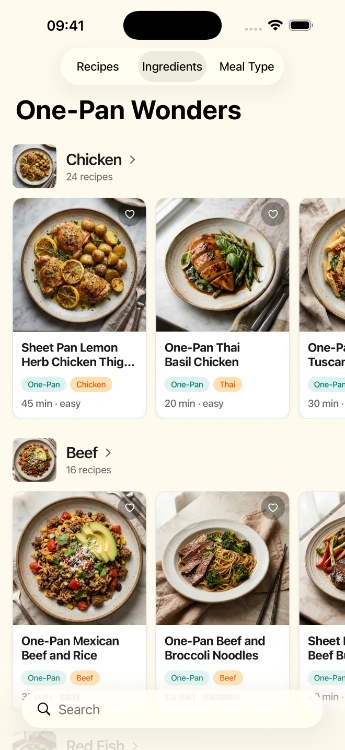
A real home for every recipe you love
Curated collections, community favorites, and your own personal cookbooks — all searchable, all in one place. No more recipes lost in a camera roll of screenshots.
And a whole lot more
The little touches that make Buttter the last recipe app you’ll download.
One-tap shopping list
Send every ingredient straight to your shopping or to-do app in a single tap.
Generate a recipe
Tell Buttter your cravings and preferences, and get something brand-new to cook.
Cooking for six when it serves two?
Change the servings and every quantity recalculates itself instantly.
Hands covered in flour?
Step-by-step guidance with the screen kept awake while you’re elbow-deep in flour.
Where did I save that one recipe?
Find any recipe across all your cookbooks by name, ingredient, or vibe.
Share with friends
Send recipes and whole cookbooks to fellow home cooks in your circle.
Three steps to done
Paste or snap
Drop a link, or photograph a cookbook page or your pantry.
Let it cook
AI formats, measures, and files it into the right cookbook.
Cook & shop
Follow along hands-free and send ingredients to your list.
What that looks like in practice
Save a TikTok with no caption at all, and still get the ingredients and steps written out properly.
Photograph what you actually have on hand, and get a real recipe built around it.
Every recipe you’ve ever screenshotted, finally in one tidy, searchable place.
Questions, answered
Everything people ask before they download.
What is Buttter?
Buttter is an AI recipe manager for iPhone and iPad. It saves recipes from any website or social app, generates new ones from the ingredients you already have, and keeps them all in one organized, searchable library.
Can it save a recipe from a video that has no written recipe?
Yes — that is the whole point. Buttter watches the video and reads the captions, then writes the ingredients and steps out properly, so a TikTok with no caption still becomes a real recipe.
How do I import a recipe?
Paste a link from any recipe site, or use the iOS share sheet from TikTok, Instagram, YouTube or Safari and pick Buttter. The recipe lands in your library already cleaned up and formatted.
What if I have no recipe — just a fridge full of odds and ends?
Snap a photo of your fridge or pantry shelves, or type in what you have, and Buttter builds a recipe around those ingredients — matched to your diet, allergies and cuisine preferences.
Does every recipe show nutrition?
Yes. Calories, protein, carbs and a full breakdown appear the moment you import or create a recipe. There is nothing to log by hand.
Can I send the ingredients to my shopping list?
Yes. Any recipe’s ingredients export in one tap to the shopping list or to-do app you already use — Buttter doesn’t make you keep a second list inside it.
Is Buttter free?
Buttter is free to download on the App Store. Some AI features are part of an optional subscription, and the current price is always shown in the app before you subscribe.
What do I need to run it?
An iPhone or iPad on iOS 18 or later. You sign in with Apple, so there is no form to fill in and no password to remember. There is no Android or web version yet.
What happens to my recipes and photos?
They are yours. What we collect, why, and how to delete it is spelled out in the Privacy Policy.
A small, independent app
Buttter is built by Denys Rumiantsev, an independent developer. It has been on the App Store since January 2022, it is worked on continuously, and it ships in English and Ukrainian. No venture backing, no ads, no selling your recipes to anyone.
And yes — Buttter is spelled with three t’s. It is a recipe app, not the dairy product. Questions go to support@buttter.app, which a human reads.
